logo-full-color

Veyco

 Smarter tenant onboarding and referencing. Fully connected.

Arthur’s integration with Veyco streamlines the entire pre-tenancy journey, from ID and AML checks through to tenant referencing, payments and deposit registration. Less admin, fewer handoffs, and a faster move-in for everyone involved.

Category
Onboarding Services

Xero-Logo-1024x1024

Xero

Use Arthur and Xero's two-way integration to make accounting easier

Category
Accounting Platforms

Compliance, payments, referencing and peace of mind come together in one workflow

The Arthur x Veyco integration connects your tenancy applications in Arthur with Veyco's referencing and compliance workflows.

Move a tenancy to Prospective and Veyco automatically invites the applicant to complete their referencing. Results flow back directly into Arthur, so everything stays visible against the tenancy record without logging in anywhere else.

Key benefits

One workflow, end to end
Initiate ID checks, AML and tenant referencing directly from Arthur without switching between systems.

Faster tenant onboarding
Automated invitations, biometric ID and open banking checks reduce delays and manual chasing.

Built-in compliance
Stay aligned with evolving regulations through biometric ID verification, right to rent checks, AML, and PEP and sanctions screening.

Clear status and audit trail
Every step is tracked, with results returned directly into Arthur within 24 to 48 hours upon tenant completion.


How it works

  1. Start in Arthur
    A property professional creates or progresses a tenancy application in Arthur and requests an ID check, AML check or full tenant referencing.
  2. Checks with Veyco
    Arthur securely passes the required tenancy and applicant details to Veyco. Veyco issues invitations via SMS or email and runs checks using biometric ID, open banking and manual review where needed.
  3. Confirmation back to Arthur
    Once complete, confirmation is returned and displayed against the tenancy record so your team has a clear, reliable outcome.

What you can do with Veyco

Tenant referencing
  • Biometric ID verification
  • KYC, AML, PEP and sanctions checks
  • Open banking and income verification
  • Employment checks and affordability assessment
  • Manual review by Veyco’s in-house team when automated checks fail
  • Tenant journey managed via the Veyco app, with WhatsApp support and UK-based teams

Why Arthur + Veyco

Arthur brings the tenancy workflow. Veyco brings compliance and referencing.

Together, they remove friction from the most admin-heavy part of lettings and replace it with a single, connected experience.


Get started

Already using Arthur? You can enable Veyco to simplify tenant onboarding, improve compliance and speed up move-ins, without changing how your team works.

They Veyco integration is incredibly easy to set up. Just click the tab below for your step-by-step guide for how to start using the integration.

This guide will walk you through connecting your Arthur account to the integration using a webhook URL we’ve provided to you separately via email.

Before you start:
Please make sure you have received your unique webhook URL from us. You’ll need this during setup. To get this, make sure you’re subscribed to the package via the Arthur Store. If you’re facing any issues, get in touch with our Support team.

Step 1: Log in to Arthur

  1. Log in to your Arthur account.
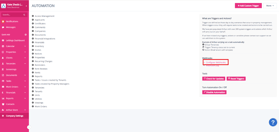
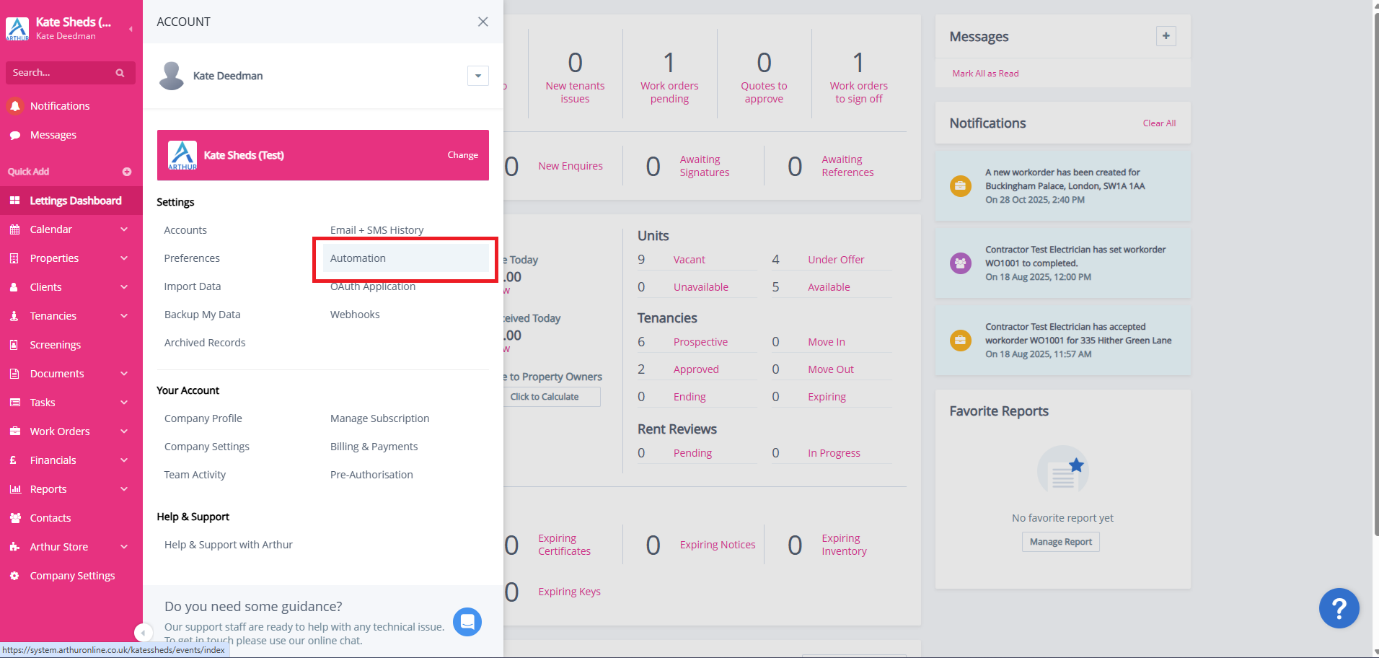
  2. Head into Automation.

Step 2: Open Automation
Picture1

Step 3: Open Webhooks

    • On the right-hand side of the Automation page, locate the Webhooks section.
    • Click Configure Webhooks.

Picture2

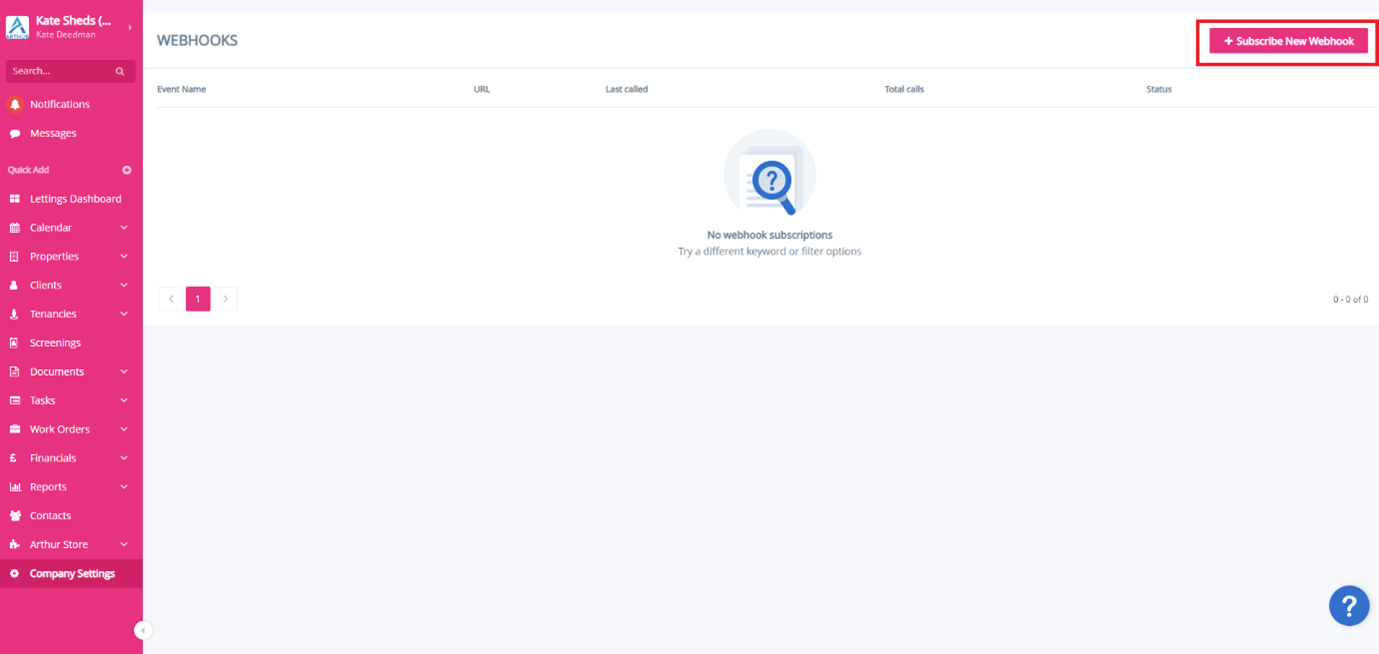
Step 4: Subscribe to a New Webhook

    • Click the Subscribe New Webhook button (top right).

A pop-up window will appear.
Picture3

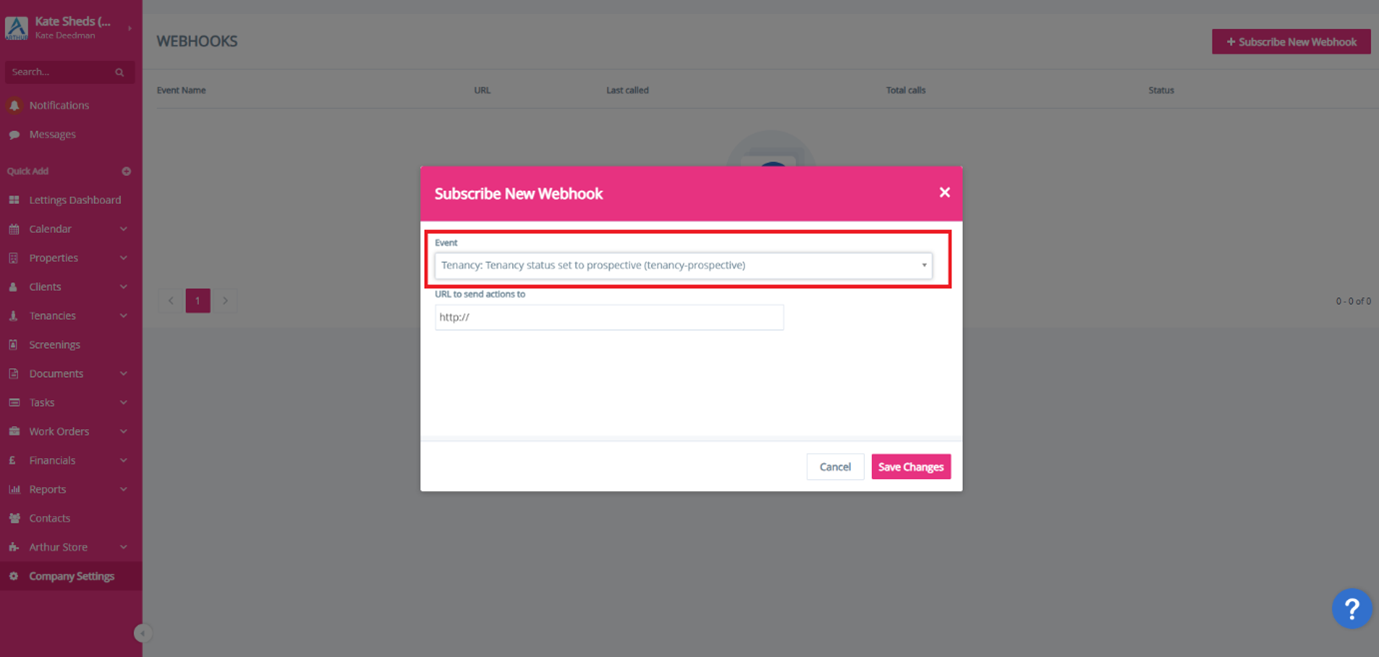
Step 5: Select the Event

    • Click the Event dropdown.
    • Select the required event:

Tenancy: Tenancy status set to prospective (tenancy-prospective)

Important: The event MUST BE equal to that above.
Picture4
 

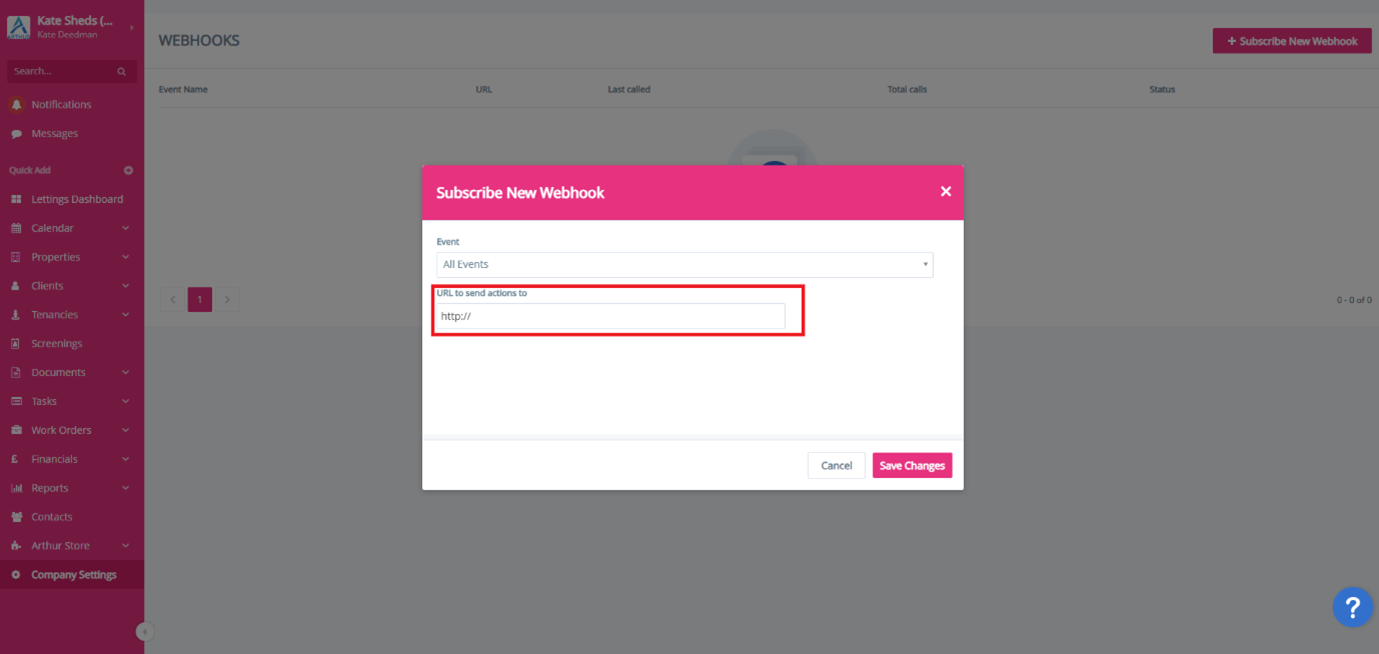
Step 6: Enter Your Webhook URL

    • In the field labelled URL to send actions to, paste the webhook URL that was emailed to you.
    • Double-check that the full URL is pasted correctly (including https://).

Important: The webhook URL must be EXACTLY the same as emailed to you. If not, the integration won’t work.
Picture5

Step 7: Save

    • Click Save Changes.

You should now see the webhook listed in your Webhooks page and the status should be “Subscribed”.


What Happens Next?

Once saved:

    • Every time a tenancy is set to Prospective, Arthur will automatically send the data to the integration via your webhook.
    • No further action is required from your side.


How to Check It’s Working

You can confirm activity by:

    • Returning to Company Settings → Automation → Configure Webhooks
    • Checking the Last Called and Total Calls columns once a tenancy moves to Prospective.

Need Help?

If you see an error or the webhook isn’t triggering:

    • Confirm the correct event is selected.
    • Confirm the webhook URL matches exactly what was emailed to you.
    • Contact support with a screenshot of your Webhooks page.
Veyco is a fully digital onboarding and compliance platform that delivers ID verification, biometric checks, AML screening, affordability assessment, full tenant referencing, and contract execution.
All onboarding is triggered from Arthur, and results are surfaced in-app for a single, joined-up experience.

Everything required to onboard tenants end to end, including:

  • Biometric ID verification

  • AML / KYC screening

  • Employment and income validation

  • Affordability checks via open banking

    Complete tenant referencing

It’s all available from day one.

Whenever a tenancy is moved into the "prospective" stage in Arthur, we automatically push the required contact and case data to Veyco.

Veyco then sends branded digital invitations to the applicant to complete the full onboarding flow. No manual chase-ups or secondary data entry are required.

  • Tenant name
  • Email address
  • Mobile number (mandatory)
  • Tenancy type (for example, single or joint)
  • Agent or branch name
  • Core case-level information for checks and reporting

This enables Veyco to complete all compliance steps and return results into Arthur.

Tenants receive a branded SMS or email from your agency with a secure link to download the Veyco app, and complete every required step digitally:

  • Biometric ID
  • AML checks
  • Affordability
  • Employment data
  • Referencing

The app guides them step-by-step with no manual back-and-forth from your team.

Full referencing is available a, covering:

  • Employment and income data
  • Affordability calculations
  • Multi-tenant support
  • Rent splits
  • Manual reviewer support where needed
  • Consolidated risk and onboarding reports

It has been designed to meet UK agent expectations for compliance, accuracy, and audit.

All check statuses, reports, outcomes, and risk indicators are presented directly inside Arthur.

This means:

  • One system for onboarding
  • One view of outcomes
  • One audit trail
  • No external portal required

You manage onboarding from the same interface you already work in.

Simple, usage-based, and charged only on completed checks. It includes:

  • ID and biometric verification via the Veyco app
  • AML / KYC screening
  • Employment and income validation
  • Affordability checks (including open banking)
  • Full referencing
  • Digital contract signing

 Just switch it on from the Arthur Store. You will receive a step-by-step guide on how to configure it in your email.

Once enabled, referencing begins automatically whenever a new tenancy is created, and results flow back into Arthur.


Arthur and Veyco operate under data processing agreements covering GDPR, consent, and lawful purposes.

For all support queries, direct your requests to support@veyco.com

Because it gives you:

  • A single onboarding trigger
  • One digital journey
  • All results shown directly in Arthur
  • Complete compliance controls
  • Fast, modern tenant onboarding
integrations-md-jul22